
ASET-registrator is a Registering device tool type, used to place an ASET-registrator element in the scenario.
ASET-registrator element in the scenario logs information related to either fire dynamics simulation, evacuation simulation, or both. For example, people’s evacuation time to the element is measured, or the moment tenability criteria limit is reached – fire hazards on the evacuation paths becoming unendurable for people.
Activating the tool type
To activate the ASET-registrator tool type:
-
Select the Registering device tool, using one of the following options:
- Click the
 button on the toolbar.
 - Select the menu item Tools | Fire | Registering Device.
- Use the keyboard shortcut Alt+H.
- Click the
-
Activate the ASET-registrator type by selecting the
 {width=05%} icon in the right pane.
Placing an element
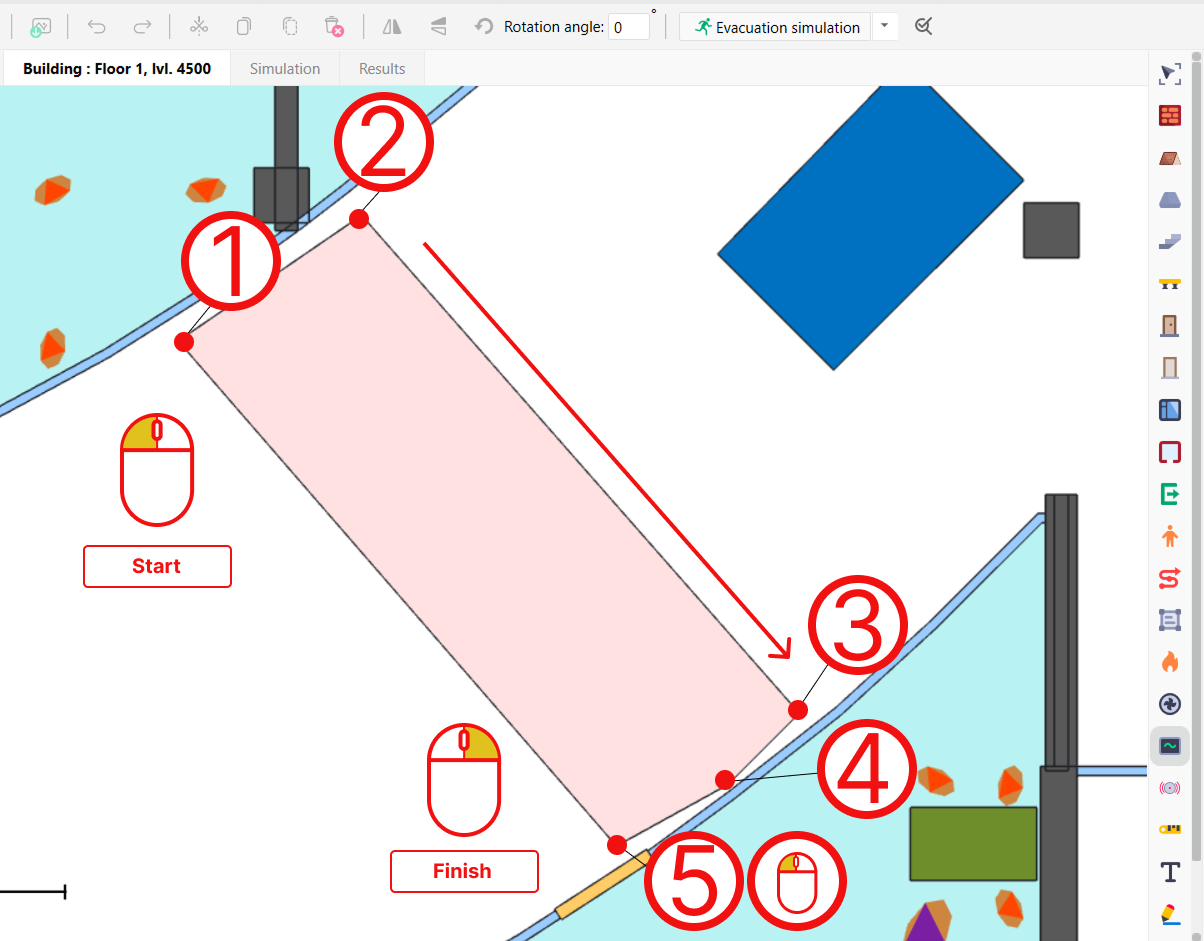
To place one ASET-registrator, left-click to set the points in the topology editor that would determine the angles of the polygon shape. Right-click to finish drawing.
Placing most elements in Fenix+ is similar for the most part, and follows a pattern with which any Solid object figure is drawn.
 {width=80%}
Modeling results
An ASET-registrator placed in the scenario produces the following results after one or multiple modeling processes are finished:
-
Evacuation simulation: a number of people walking through a ASET-registrator will be shown, and their respective evacuation time, measured from the moment an occupant left their starting point to the moment they have reached the first edge of the ASET-registrator).
-
Fire dynamics simulation: for each ASET-registrator element placed in the scenario Fenix+ will create a separate result data point, showing a dynamic of fire hazards measuared inside the ASET-registrator’s perimeter. For one fire hazard to reach critical value, a certain percentage of ASET-registrator’s area should reach the critical values (set by the Share parameter). You can set which fire hazards should be recorded across all types of registering devices (default and ASET) in Menu > Simulation > ASET/RSET analysis parameters.
-
Evacuation simulation and Fire dynamics simulation: “Comparison of evacuation and fire” section in the Results tab will show values necessary to perform an ASET/RSET analysis. Compared are the ASET-registrator’s time when fire hazards reached its critical values and evacuation time.
Both Evacuation simulation and Fire dynamics simulation will be processed after starting ASET/RSET calculation.
Modeling process
Fenix+ creates an SLCF parameter group in the input FDS file for each of the measured fire hazards.
Parameters
The ASET-registrator has the following unique parameters:
-
Share (in %) – the percentage of the ASET-registrator area in which fire hazards must reach their critical values for the ASET-registrator to be marked as blocked (a location reaching its tenability criteria limit). Fire hazards are measured in the cells of a Calculation Area placed over the ASET-registrator.
For example, at 50%, the device is marked as blocked only if half of calculation cells within the drawn area has reached the critical value of a fire hazard.
If set to 0, registrator will be marked as blocked when any one calculation are cell in the zone reaches the critical value.
-
Critical Visibility — the critical value of the “Visibility” fire hazard, set exclusively for this placed element. By default, a “Visibility” value for all registering devices (and ASET-registrators) is set in ASET/RSET analysis parameters (Menu > Simulation > ASET/RSET analysis parameters).
General parameters, similar to the Solid object elements in Fenix+. Available after placing an element and selecting it:
- Level — level above the ground, crucial for determining if the occupant models are passing through the ASET-registrator element.
- Name;
- Display object name checkmark;
- Visibility checkmark.